


This product is available natively in English, but it has automated translations for most major languages.
Contents: Tiling Window Manager (◫⚙), Tabs (), Tiles (◫), Group Top (⇑), Group Bottom (⇓), Group Left (⇐), Group Right (⇒), Group Tab (Tab), Unjoin (⎌)
Tiling Window Manager (◫⚙)
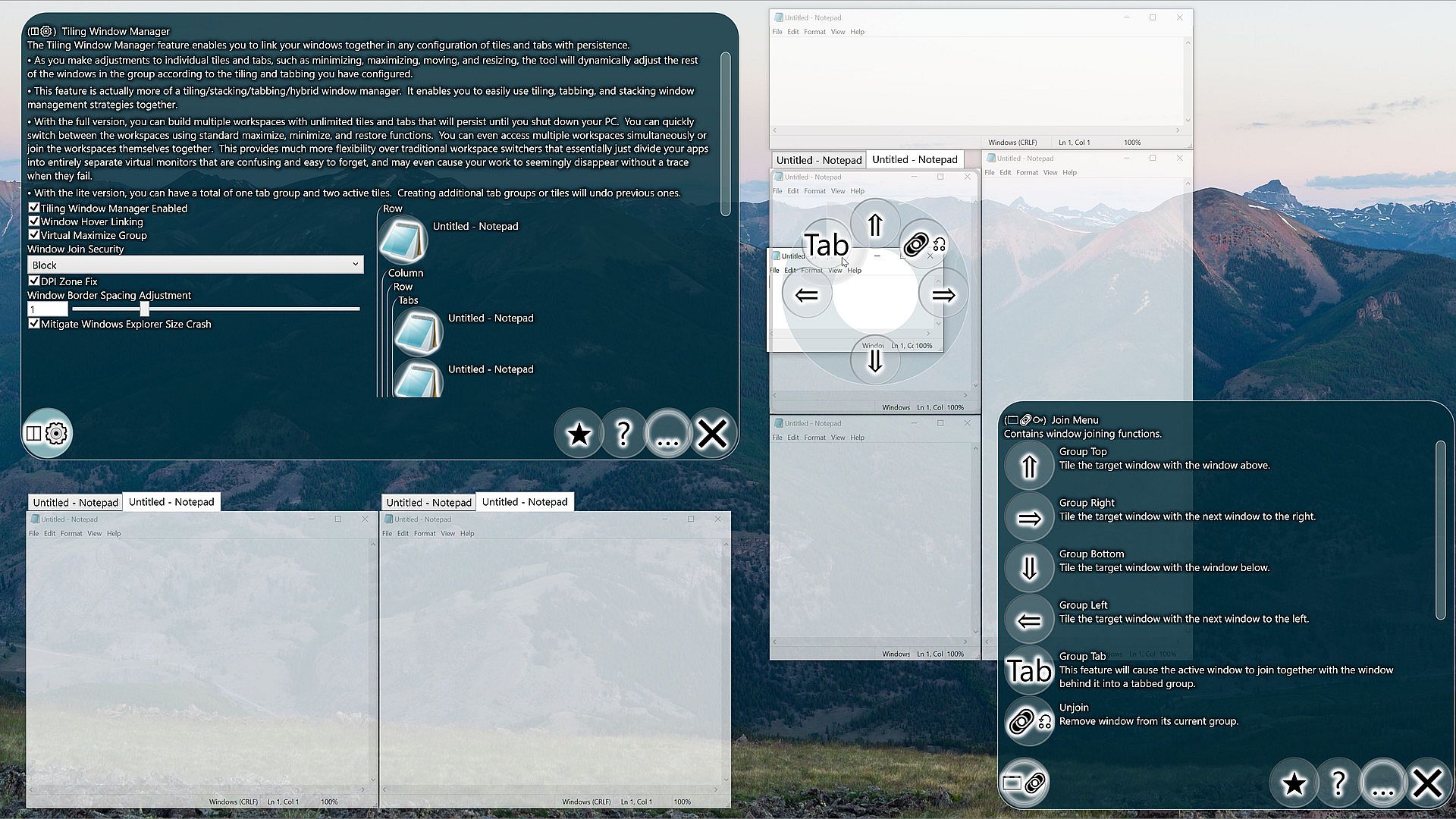
The Tiling Window Manager feature enables you to link your windows together in any configuration of tiles and tabs with persistence.- As you make adjustments to individual tiles and tabs, such as minimizing, maximizing, moving, and resizing, the tool will dynamically adjust the rest of the windows in the group according to the tiling and tabbing you have configured.
- This feature is actually more of a tiling/stacking/tabbing/hybrid window manager. It enables you to easily use tiling, tabbing, and stacking window management strategies together.
- With the full version, you can build multiple workspaces with unlimited tiles and tabs that will persist until you shut down your PC. You can quickly switch between the workspaces using standard maximize, minimize, and restore functions. You can even access multiple workspaces simultaneously or join the workspaces themselves together. This provides much more flexibility over traditional workspace switchers that essentially just divide your apps into entirely separate virtual monitors that are confusing and easy to forget, and may even cause your work to seemingly disappear without a trace when they fail.
- With the lite version, you can have a total of one tab group and two active tiles. Creating additional tab groups or tiles will undo previous ones.
- Tiling Window Manager Enabled (Default: True)
When enabled, the tiling window manager will dynamically adjust your windows according to the tiling and tabbing configurations you have enabled. You can disable the feature to pause the tiling and tabbing interactions, and reenable to resume. - Window Hover Linking (Default: True)
When enabled, moving a window over top of another window will cause a window linking menu to appear. To use the menu, hold the cursor over a menu button until the loading indicator completes and then release the cursor. To aid in selecting a window, each window will only be highlighted once per window drag, so if the wrong window gets highlighted, simply drag your cursor outside of that window and the next time you move your cursor over your selected window, the previously highlighted window will be ignored. - Virtual Maximize Group (Default: True)
When maximizing a window that is part of a group, spread the group's windows over the screen instead of performing a standard operating system maximize operation. - Window Join Security (Default: Block)
This setting can protect against an unsecured app joining itself to a secured app. If an unsecured app can do this, it can potentially relocate a secured app in front of your mouse right before you click causing a click on a secured application. This would be a very complicated way to attack your computer, so it would be a very unlikely attack vector, though I still can't let you take that risk by default.
- Block: When selected, attempts to join a window to a window with a higher security level are blocked. (Safest)
- Allow: When selected, attempts to join a window to a window with a higher security level are allowed. - DPI Zone Fix (Default: True)
When enabled, tries to avoid conditions which cause unexpected behavior on multiple monitor systems with DPI differences. - Window Border Spacing Adjustment (Default: 1)
With this option, you can adjust how much the tool accounts for window borders when moving windows in groups. - Mitigate Windows Explorer Size Crash Min Width (Default: 300)
When performing certain operations on a Windows Explorer window that is below a certain size, Windows Explorer may crash. To prevent this from happening, the tool will try to avoid setting Windows Explorer windows below this size. You may not actually need this enabled, as some users do not experience the issue, but I have enabled it by default because it is a pretty bad first impression of my product if you happen to run into this bug immediately. Set the value to 0 to disable. The exact minimum size that the problem occurs also seems to vary, so you may need to raise this if explorer windows are glitching out, or alternatively you could lower it if you want smaller windows and are not experiencing the bug. The bug is not specific to Simplode Suite Long Debug, but the mitigation feature can in some cases prevent the bug from happening even when performing operations unrelated to the tool. It does this by detecting when a Windows Explorer window is resized, and increasing the size if it happens to be too small.
Tabs ()
Enables the ability to create unlimited tab groups with unlimited tabs.- This entry is for information and licensing only, see related actions for how to use the feature.
Tiles (◫)
Enables the ability to create unlimited tile groups and unlimited tiles per group.- This entry is for information and licensing only, see related actions for how to use the feature.
Group Top (⇑)
Tile the target window with the window above.- When in a group, attempt to swap the active window with the window above.
- When not in a group, attempt to join with the nearest window above.
Group Bottom (⇓)
Tile the target window with the window below.- When in a group, attempt to swap the active window with the window below.
- When not in a group, attempt to join with the nearest window below.
Group Left (⇐)
Tile the target window with the next window to the left.- When in a group, attempt to swap the active window with the window to the left.
- When not in a group, attempt to join with the nearest window to the left.
Group Right (⇒)
Tile the target window with the next window to the right.- When in a group, attempt to swap the active window with the window to the right.
- When not in a group, attempt to join with the nearest window to the right.
Group Tab (Tab)
This feature will cause the active window to join together with the window behind it into a tabbed group.Settings:
- Tab Rearrange (Default: True)
When enabled, you can reorder tabs of tab grouped windows by clicking and dragging the tab over its neighboring tabs.